#OpenSourceHiggsfield ComfyUI Open weights MIT

Bullet Time from one phone shot

Freeze any moment of your take and fly the camera around it, the way a ring of 100 cameras would. Then the camera lands back on your real frame and the take carries on, with its real sound.

1 clipfrom your phone
2 jobsQwen views + LTX orbit
360°full orbit
~$0.10per bullet time
real Comfy Cloud output · orbit-360, all 8 views
How it works

Time stops. The camera doesn't.

The take is never retimed outside the ramp, so speech before and after the freeze stays in sync with its own audio. Every arc starts and ends on the real frame, so both cuts land on the same image.

Pick the moment

OpenCV scores every frame by motion x sharpness, so the freeze lands on the peak without blur. MediaPipe rules out closed eyes: nobody wants to orbit a blink. Scrub to pick your own.

free · CPU

8 views

Qwen-Image-Edit 2511 with the Multiple-Angles LoRA, prompted in its trained <sks> format. Each still is checked; a sideways or upside-down view is rejected.

1 job · ~$0.045

The orbit

LTX-2.3 22B: your real frame sits in the latent, every view becomes an LTXVAddGuide keyframe, and the prompt holds time still. Two stages up to 704x1280, audio in the same pass.

1 job · ~$0.055

Splice

ffmpeg ramps into the freeze, plays the orbit, rewinds home and resumes on the very frame it froze on.

free · ffmpeg
real frame
◂ dragdrag ▸
One frozen frame, a full turn

Drag to walk around the moment

These are 32 frames of a real orbit-360 render from Comfy Cloud. Qwen saw one frame of a phone selfie and invented the rest of the ring; LTX-2.3 flew a continuous camera through those views while time stood still.

0° real frame180° behind360°

The real frozen frame followed by the 8 Qwen views used as keyframes

The keyframes behind it: the real frame, then the 8 Qwen views. The third first came back rotated 90°. The orientation check rejected it and re-rolled just that one view (about $0.025), so the orbit gets all 8. Every orbit frame is also colour-matched to the real frame, so the grade doesn't drift from your take.
Camera arcs

Six moves, one click each

Seen from above: you are the dot, the phone was at the bottom. Every move starts and ends on the real frame.

Full orbitorbit-360

real → all the way around → real

6.4 s freeze
Orbit rightorbit-right

real → front quarter → side, 90°

4.0 s freeze
Orbit leftorbit-left

real → front quarter → side, 90°

4.0 s freeze
Matrix sweepsweep

real → right → left → real, 180°

4.8 s freeze
Half orbit behindhalf-right

real → right → back-right → back

5.6 s freeze
Crane upcrane

real → high angle, seen from the side

3.0 s freeze
Demo

Watch it end to end

Left: a finished 24.8 s take, straight out of the app with its real sound. Turn the sound on. Right: the walkthrough, from phone clip to bullet time.

Demo video coming soon Until then, the take on the left is a real output of the app.
The app

Drop a clip, pick a move, Generate

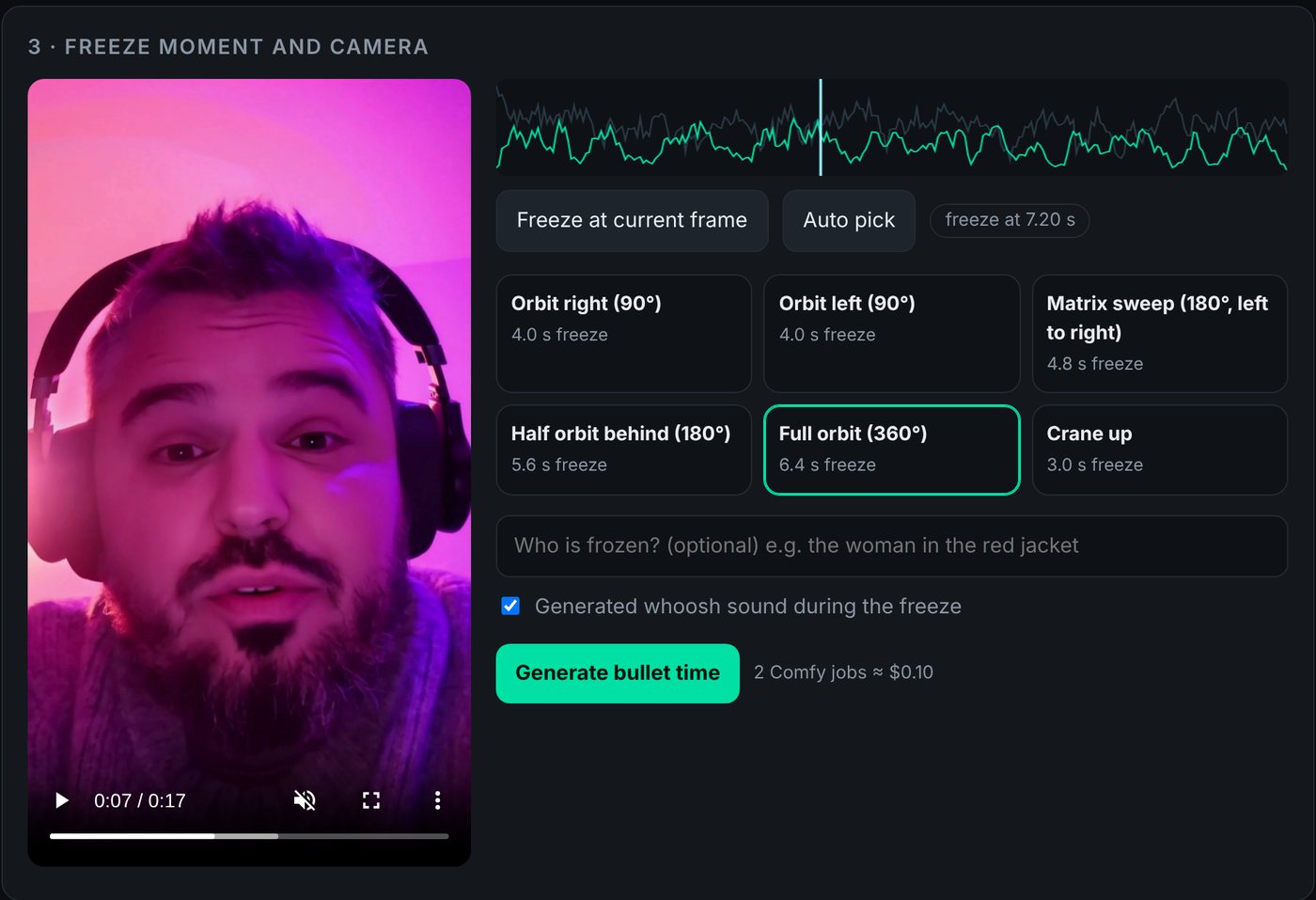
A small local web app runs the whole pipeline. It shows where the motion peaks, lets you scrub to the exact frame, and prices the run before it spends anything.

The Bullet Time web app: the take on the left, a motion graph with the freeze marker, the five camera arcs and the Generate button

Your key stays yours

The Comfy Cloud key lives in your browser and is forwarded per request through your local server. Never written to disk or logged.

Re-roll cheaply

Keep the 8 views and re-roll only the orbit (1 job), or change the ramp and slow-mo and re-render for free.

Take the graphs with you

ComfyUI workflows downloads the exact API graphs submitted for your result, ready to open in ComfyUI.

Run it

Five commands to your first freeze

Python 3.10+ and ffmpeg on PATH. No local GPU needed: generation runs on Comfy Cloud with your own key.

> git clone https://github.com/apsolut/bullet-time-comfyui
> cd bullet-time-comfyui
> python -m venv .venv && .venv\Scripts\activate
> pip install -e .
> bullettime serve           # http://127.0.0.1:8790

Prefer the command line?

# set COMFY_API_KEY first (never commit it)
# free: where would it freeze?
$ bullettime analyze take.mp4
# plan + cost, then the real run
$ bullettime -P work run take.mp4 --arc sweep --dry-run
$ bullettime -P work run take.mp4 --arc sweep --out bt.mp4
# re-roll only the orbit (same views), or re-render for free
$ bullettime -P work orbit --arc orbit-left
$ bullettime -P work render --ramp 0.8 --slow 4
# the exact graph, for ComfyUI
$ bullettime workflow --arc sweep > sweep_api.json

In the web app

  1. Paste your Comfy Cloud API key and press Check.
  2. Drop a clip, up to 30 s, one person.
  3. Check the moment it picked, or scrub and press Freeze at current frame.
  4. Pick an arc and press Generate bullet time. About two minutes later you have an MP4.

Film for it

  • A clear peak: a jump, a hair flip, a throw, a splash.
  • Good light, so the frozen frame is sharp.
  • Keep the person in frame with some room around them.
v0.2 Studio

Built to run as a service, not a toy

Everything a team needs, still all open weights on Comfy Cloud. See Studio use in the README.

Fix one view

A rejected view (sideways, wrong orientation, closed eyes) is re-rolled on its own in a pruned single-view graph, automatically before every orbit.

~$0.025 per view

Variants

Three orbits with different seeds submitted at once. Pick the best one in the web app.

3 x $0.055

Colour match + upscale

KJNodes ColorMatch locks the orbit's grade to your real frame. SeedVR2 3B takes it to a 1080 short side, with its audio.

free · ~$0.12

Studio export

ProRes 422 HQ master, H.264 delivery, the freeze loop, every view, timeline.json for your NLE, the cost ledger and the exact graphs that ran.

free

One container for the team

Docker or Fly.io (Frankfurt config included). No GPU on the host: generation never touches it.

Shared key and password

A server-side Comfy Cloud key so nobody pastes one, and an app password on every API call.

Guard rails and a ledger

Jobs in flight are capped, transient Comfy Cloud errors retry with backoff, and every paid job is booked against your balance.

Open weights, end to end

No partner or closed API nodes

Everything runs as plain ComfyUI graphs on Comfy Cloud. The graphs live in workflows/ with a bindings file that maps the app's inputs to node ids.

StepModelLicense
8 viewsQwen-Image-Edit-2511 + Multiple-Angles LoRA + Lightning 4-stepApache-2.0
Orbit + audioLTX-2.3 22B dev fp8, distilled LoRA 0.6, x2 spatial upscaler, Gemma 3 text encoderLTX-2 Community License, Gemma Terms
Moment + spliceOpenCV + ffmpeg, no modellocal, free

Honest limitations

  • Qwen invents what the phone never saw, like the back of your head. Back views are the weakest, so orbit-* and sweep stay in front of you.
  • LTX can let a frozen person drift slightly (a blink, hair moving). Re-roll the orbit, or describe the person in Who is frozen?
  • One person, one take, up to 30 s. Output is upscaled from 704x1280.

Use it kindly

  • Only use your own face, or the face of someone who agreed.
  • Don't post it where it could pass as real footage of an event.
  • Code is MIT. The models keep their own licenses.
Built for the Comfy challenge

Open Source Higgsfield

A Higgsfield-style effect, rebuilt as an open ComfyUI app. Sibling of One-Shot Multicam, which turns one selfie into a multicam edit.